

Splunk is one of the world’s most widely used platforms for collecting, indexing, and analyzing data from across enterprise environments, including servers, applications, cloud services, and network devices. It is commonly used by security operations teams as a Security Information and Event Management (SIEM) platform to centralize log data, correlate events, detect threats, investigate incidents, and accelerate response.
For organizations that rely on both SAP and Splunk, integrating SAP security logs with Splunk is an important step toward achieving unified enterprise threat detection for Security Operations Centers (SOC). However, direct integration is challenging due to the complexity of multiple SAP log sources, inconsistent log formats, high raw data volumes, ongoing maintenance demands, increased storage and licensing costs, and limited native enrichment for effective cross-platform threat correlation. As a result of the challenges detailed below, SOC teams often struggle to successfully connect SAP endpoints with Splunk.
Complexity of SAP log sources
SAP systems generate security-relevant events across multiple logs, including the Security Audit Log, Gateway Server Log, HTTP Log, System Log, Transaction Log, Change Document Log, and Read Access Log, as well as logs for HANA, BTP, Java, and other solutions. This makes direct integration with Splunk complex, especially across large SAP landscapes.
Lack of standardized log formats
SAP logs differ in format, structure, and storage method. Some logs are file-based, while others are stored in SAP tables. This creates challenges for consistent parsing, normalization, and ingestion into Splunk.
High log volume
Large SAP environments can generate very high volumes of raw log data. Transmitting this data to Splunk can increase network bandwidth usage, storage requirements, and SIEM licensing costs.
Integration maintenance burden
Organizations must maintain multiple integration points between SAP systems and Splunk. This includes managing connectivity, log collection, parsing rules, data retention, and archiving.
Limited enrichment in native SAP logs
Many SAP logs do not include the context needed for effective correlation in Splunk, such as source IP addresses, destination IP addresses, user context, system context, or business process details.
Difficult cross-platform correlation
SOC teams may struggle to correlate SAP activity with non-SAP telemetry from endpoints, networks, cloud platforms, identity systems, and other enterprise security tools.
Scalability challenges in large SAP landscapes
The complexity increases significantly when organizations need to integrate logs from multiple SAP systems, environments, applications, and instances.
Cost control
Sending large volumes of raw SAP log data into Splunk can increase infrastructure, storage, and licensing costs.
Operational noise
Raw SAP logs can contain large amounts of low-priority or repetitive events. Without filtering, normalization, and enrichment, SOC teams may face alert fatigue and reduced detection efficiency.
Reduced investigation efficiency
When SAP logs are incomplete, inconsistent, or difficult to correlate, analysts may need to manually investigate events across multiple SAP tools and Splunk searches, slowing incident response.
A further challenge is the lack of predefined rules in Splunk to detect SAP-specific threats. Splunk may centralize SAP logs, but it does not provide the intelligence required to interpret SAP events in the logs to identify threats. As a result, SOC teams often develop and maintain their own SAP-specific detection rules, despite lacking the specialized SAP security expertise required to do so effectively. This can lead to security blind spots and reduce the ability to successfully detect SAP threats.
These challenges can be addressed by integrating SAP logs with Splunk using the Cybersecurity Extension for SAP (CES). CES provides more than 1,200 out-of-the-box patterns for identifying threats in SAP solutions, enabling SOC teams to monitor SAP logs immediately without investing extensive time and effort in building and maintaining custom detection rules. It delivers the SAP-specific intelligence needed to interpret log activity in Splunk, while monthly updates keep detection content aligned with new threats and vulnerabilities affecting SAP solutions. CES generates and forwards alerts to Splunk in real time, and filters, normalizes, and enriches data before it reaches Splunk. This provides a simpler, faster, and more effective approach for integrating SAP security events with Splunk.
Data can be streamed from CES to Splunk using either the Universal Forwarder or Heavy Forwarder for Splunk. Both are software log collection agents. The Universal Forwarder is a more lightweight agent than the Heavy Forwarder and therefore consumes fewer system resources. The Heavy Forwarder can parse, transform, and even index data locally. However, these functions are not required by CES. The Heavy Forwarder requires higher resources than the Universal Forwarder. As an alternative to the Forwarders, data can be forwarded from CES to Splunk via Syslog (rsyslog). This method may be required if it is not possible to install the Universal Forwarder on the target SAP server.
Once the agent is installed and configured in the host for CES, it will stream data from CES to Splunk. The next step is to create an index in Splunk for CES. An index is a logical storage location where Splunk stores incoming data after it has been ingested and processed. When Splunk receives log or event data, it breaks the data into searchable events and stores them in the target index. Users can query the index to find, analyze, correlate, and report on data.
The final step is to install the Splunk app for the Cybersecurity Extension for SAP. The app is available on Splunkbase. Splunk apps are addons that include predefined data models, configurations, dashboards and reports for specific use-cases. They help to accelerate deployment, reduce operational effort, and improve adoption. The Splunk app for CES is installed as a .tgz package using either the Splunk Web Interface or Command Line Interface (CLI). Once installed, you can access the app from the Splunk App menu.
The app parses the data from the CES index and provides preconfigured dashboards to analyze and manage results. The results are structured into three domains: Alerts, Vulnerabilities, and Security Notes. Each domain can be analyzed separately. Alerts are based on pattern matches for threat detection rules applied by CES. Rules can be tuned using exclusion rules in CES to reduce noise and false positives. They can be analyzed and filtered based on date, time, system, environment, priority, and other criteria. Vulnerabilities are system and user-related security weaknesses in SAP solutions detected by CES based on daily automated security scans using a library of 3000+ SAP-related checks. Security notes are relevant, unapplied security patches calculated by CES. The app tracks the implementation status of security notes across SAP systems.
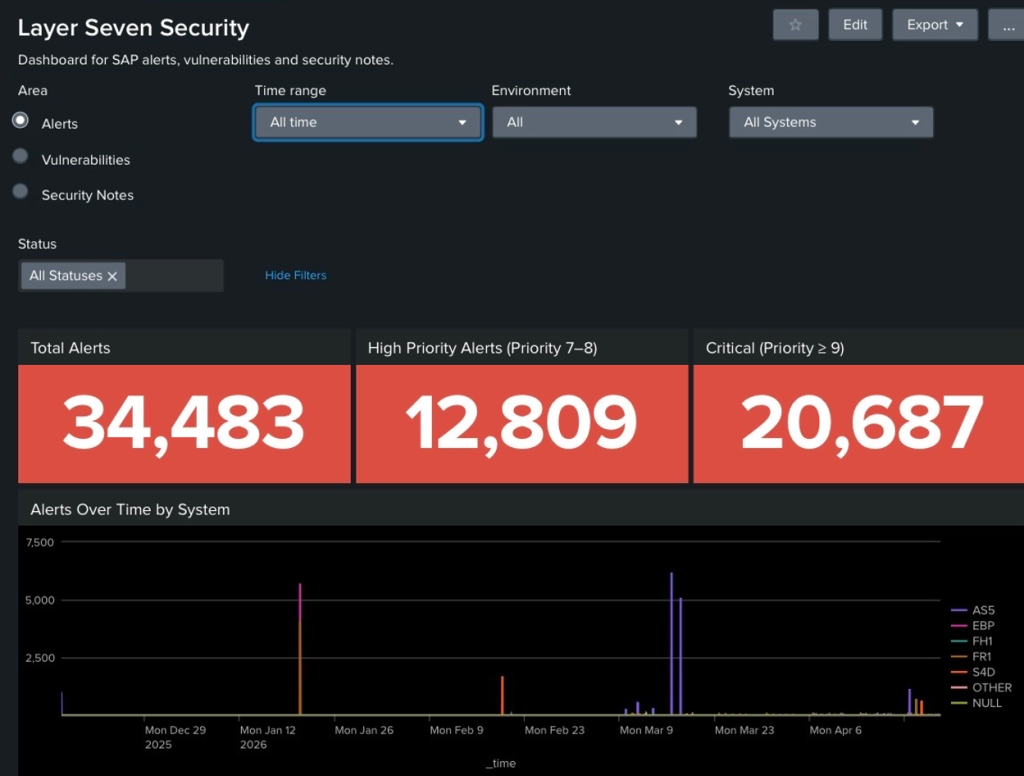
The app enables users to drill down from summary tiles and dashboards into detailed results for alert triage. These detailed results provide the context needed to answer the five Ws of security alerts:
Who
Identifies the user, service account, role, host, IP address, or system involved.
What
Describes the activity that occurred, such as a failed login, privilege change, suspicious command, vulnerable function call, data access, configuration change, or policy violation.
When
Shows when the event occurred, including the date, time, timezone, frequency, and whether the activity took place inside or outside normal operating hours.
Where
Identifies where the event occurred, such as the SAP system, client, application server, database, endpoint, cloud service, network segment, source location, or destination system.
Why
Explains the risk, business impact, and recommended investigation steps.
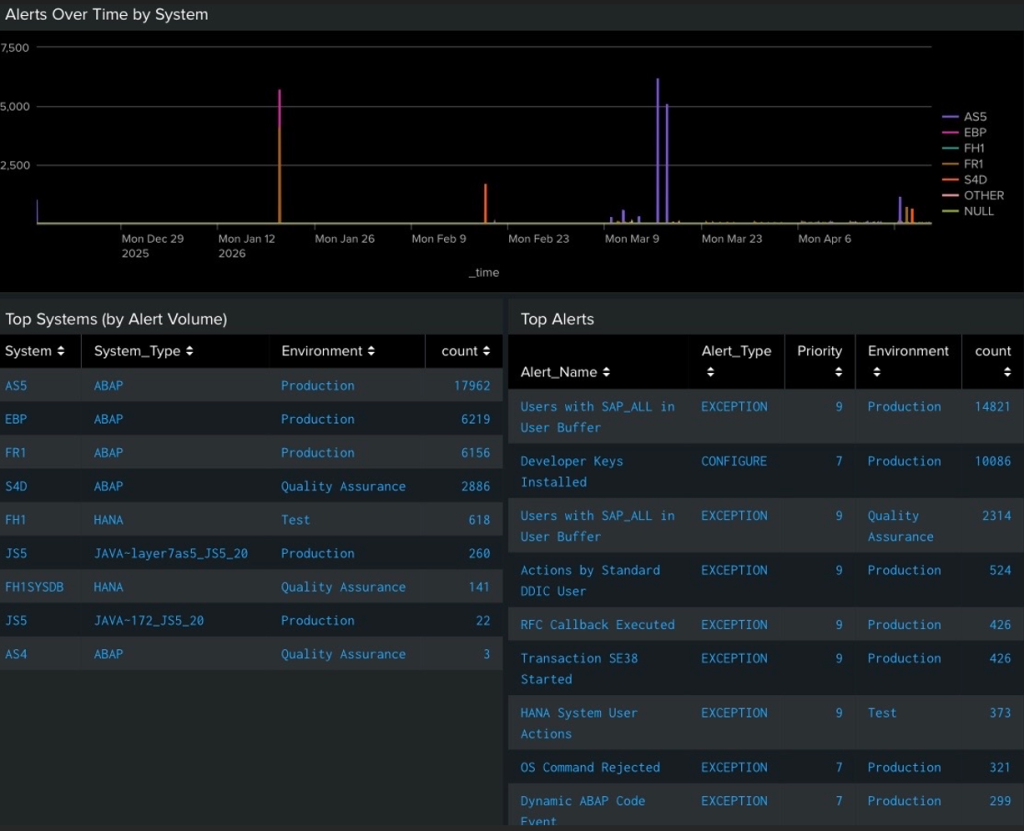
Status changes for alerts, vulnerabilities, and security notes are synchronized between CES and Splunk, ensuring that Splunk results remain current and reflect updates made by administrators in CES. Results are refreshed at regular intervals to further strengthen synchronization between the two solutions. The refresh rate can be adjusted to meet each organization’s specific requirements.
Integrating SAP logs with Splunk is more than a technical exercise. It is an opportunity to extend enterprise security monitoring to the systems that support an organization’s most critical business processes. By using CES to detect, filter, normalize, enrich, and forward SAP security events to Splunk, organizations can reduce integration complexity, lower operational overhead, and provide SOC teams with the SAP-specific intelligence needed to detect and respond to threats more effectively. The result is a faster, more scalable, and more actionable approach to SAP threat monitoring in Splunk.