

The SYSTEM user is the most powerful database user in SAP HANA, possessing system-wide privileges to create users, modify system configurations, and manage databases. Because it is a well-known account with full administrative authority, it is a primary target for attackers. Securing this user is essential to preventing unauthorized system changes and data breaches.
Why must you secure the SAP HANA SYSTEM user?
The SYSTEM user is created during the initial setup of SAP HANA. Once the environment is configured, the SYSTEM user should not be used for day-to-day administrative tasks. Instead, organizations should create dedicated, least-privileged users for specific administrative scenarios and keep the SYSTEM user deactivated, reactivating it only for emergency tasks, system upgrades, or migrations.
Hardening and Monitoring Strategies
To protect your HANA environment, follow these four critical security measures:
1. Reset the Initial Password
Immediately after the initial handover from hardware partners or administrators, reset the SYSTEM user password for both the system database and the first tenant database. Use SQL statements or the SAP HANA cockpit, ensuring the action is performed by a user with USER ADMIN or DATABASE ADMIN privileges.
2. Deactivate the User
The SYSTEM user should remain deactivated to prevent its use in production environments.
- Deactivate:
ALTER USER SYSTEM DEACTIVATE USER NOW - Reactivate:
ALTER USER SYSTEM ACTIVATE USER NOW - Verification: Review the
USERDEACTIVATED,DEACTIVATIONTIME, andLASTSUCCESSFULCONNECTcolumns in theUSERSsystem view.
3. Create Audit Policies
Implement audit policies to log all actions performed by the SYSTEM user, as well as changes to the account itself (e.g., password changes or activation/deactivation). Use the SAP HANA cockpit or SQL statements to ensure both successful and unsuccessful events are captured and retained according to your organization’s policy.
4. Monitor the Audit Trail
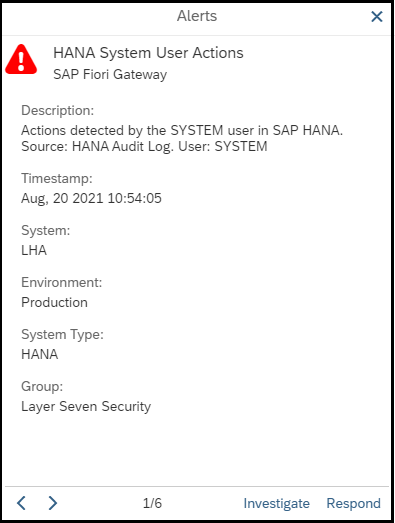
Integrate your HANA audit logs with SAP Solution Manager or your enterprise SIEM system. Configure automated alerts for any activity associated with the SYSTEM user so security teams can investigate suspicious events immediately using guided procedures.
Frequently Asked Questions
When should the SYSTEM user be reactivated?
The SYSTEM user should only be reactivated for emergency administrative tasks, system upgrades, installations, and migrations (including support stack and enhancement pack upgrades). It should be deactivated immediately after these tasks are completed.
How can I verify if the SYSTEM user is currently active?
You can verify the status of the SYSTEM user by querying the USERS system view in SAP HANA. Specifically, check the USER_DEACTIVATED column to see if the account is currently disabled.
What is the advantage of integrating HANA audit logs with a SIEM?
Integrating audit logs with a SIEM (Security Information and Event Management) system allows for centralized monitoring, correlation of events across the entire IT landscape, and faster incident response times for unauthorized administrative activity.