

Securing the Linux operating system is a critical component of SAP system hardening, as vulnerable hosts can provide a pathway to compromise SAP applications, databases, and critical files. By implementing automated vulnerability scanning and real-time log monitoring, organizations can protect their SAP HANA and S/4HANA environments against unauthorized access and ransomware.
Why is Linux security critical for SAP HANA?
Securing operating systems is a foundational element of SAP system hardening. When an underlying host is vulnerable, attackers can bypass security mechanisms applied at the application or database layers. This exposure can lead to the corruption of critical tables and files, or support ransomware attacks that disrupt the availability of vital SAP services. Because SUSE Linux Enterprise Server (SLES) supports 85 percent of HANA deployments worldwide, ensuring its integrity is essential for the security of the broader SAP ecosystem.
How does automated scanning protect SLES hosts?
The Cybersecurity Extension for SAP performs daily automated scans to identify vulnerabilities across the Linux host environment. This process maps SLES vulnerabilities directly to SAP systems, allowing for holistic security management across code, application, database, and operating system layers.
The scanning process evaluates several key security areas:
- Authentication settings and root access
- Firewall and network configurations
- File and service permissions
- Missing security patches and vulnerable packages
- Logging and auditing settings
- Open TCP/UDP ports targeted by attackers (e.g., FTP, RPC, RDP, SSH, and Telnet)
What indicators of compromise should you monitor?
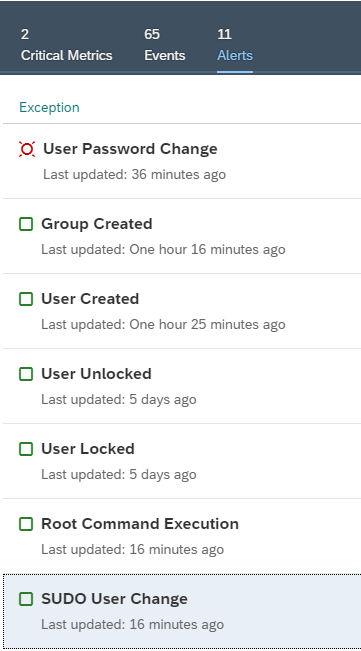
Continuous monitoring of SLES logs allows organizations to detect security incidents and channel alerts to SIEM or service desk systems. The Cybersecurity Extension for SAP monitors for the following indicators of compromise:
| Monitoring Category | Specific Indicators |
|---|---|
| System Changes | OS configuration, kernel parameters, and profile changes |
| Network & Access | Firewall settings, external connections, and failed logons |
| File Integrity | File system mounts, permission changes, and critical file modifications |
| User Management | Sudo commands, group/user changes, and account lock/unlocks |
| Process Control | Cron jobs, daemon/service changes, and OS code injection |
What is the role of audit logs in incident response?
Audit records from the SLES audit log are essential for forensic investigations, providing visibility into the exact user and event that triggered a security alert. The Cybersecurity Extension for SAP integrates incident response procedures directly into the workflow. Users can select the “Respond” option from an alert to initiate an investigation and document findings, ensuring that security teams can quickly address potential threats before they escalate.
Frequently Asked Questions
Why is SLES the primary focus for SAP HANA security?
SUSE Linux Enterprise Server (SLES) is the leading operating system for SAP HANA and S/4HANA, supporting 85 percent of global deployments. Because it is the foundation for these systems, securing SLES is a critical first step in preventing unauthorized access to the application and database layers.
How does the Cybersecurity Extension for SAP assist with forensics?
The extension provides integrated incident response procedures that allow users to investigate alerts directly. It displays audit records from the SLES audit log, including the specific audit event number and the auid of the initial user who triggered the event, facilitating faster and more accurate forensic analysis.
Can the Cybersecurity Extension for SAP integrate with existing SIEM systems?
Yes. The extension monitors SLES logs for indicators of compromise and channels relevant alerts and notifications to external SIEM and service desk systems, ensuring that security incidents are captured within the organization’s broader security operations center.